What Is Salesforce and What Does It Really Do? A Complete Guide for Professionals
In 10 minutes, you’ll know whether Salesforce CRM can accelerate your sales, simplify your operations, and give your team a true edge—powered by AI agents working alongside your people, all from one platform.
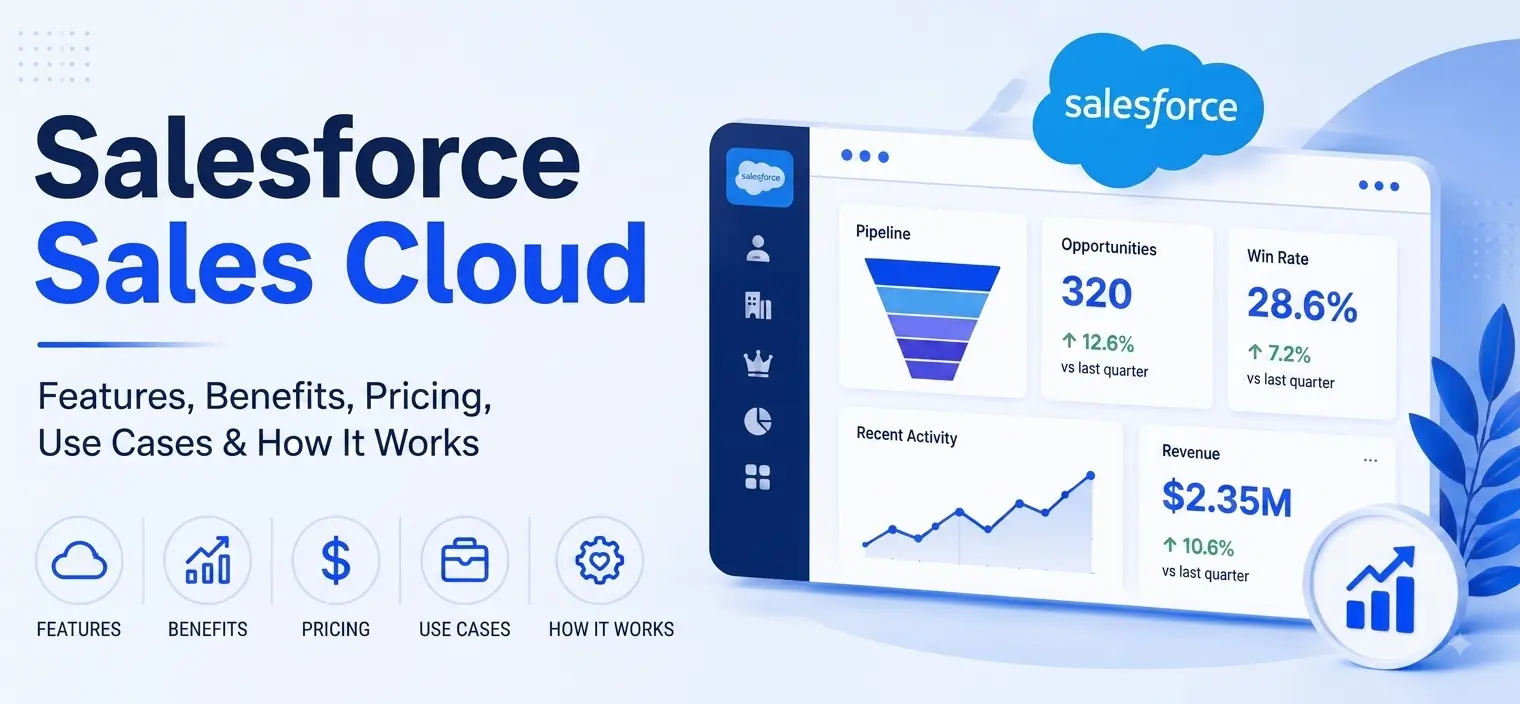
Salesforce is a cloud-based CRM (Customer Relationship Management) platform that helps companies manage sales, customer service, marketing, and business operations in a single, unified system. Instead of your team using separate tools and spreadsheets, Salesforce centralizes customer information in one place, so everyone works with the same data and stays in sync. What makes Salesforce powerful in 2026 isn’t just centralization—it’s intelligence. Built-in AI agents through Agentforce handle routine work so your team can focus on high-value activities.
“Salesforce helps your team track every customer, every deal, and every conversation without juggling spreadsheets or disconnected tools.”
Picture a sales rep with six browser tabs open, flipping between emails, call notes, and three spreadsheets just to get a customer’s story straight. With Salesforce, instead of piecing together scattered details, the entire team instantly sees everything in one place. It also centralizes your entire business on a single platform, so you can sell faster, serve customers better, make smarter decisions, automate repetitive tasks, and scale without chaos.
Add AI agents from Agentforce into the mix, and your team doesn’t just work together more efficiently—they work alongside autonomous agents that handle qualification, research, and routine customer interactions 24/7.
See how Salesforce replaces disconnected tools with one intelligent platform your entire team will actually use.
Book a Free ConsultationRead Also: Top 20 Salesforce Consulting Companies in 2026 — Deep Dive & Data-Driven Guide
Salesforce, the #1 CRM globally, offers a suite of tools built to meet specific business needs across industries such as healthcare and IT. Now enhanced with Agentforce, Salesforce’s agentic AI platform that deploys autonomous agents across sales, service, and marketing operations.
How does Salesforce compare to alternatives like HubSpot or spreadsheets? Unlike basic spreadsheets that require manual tracking or entry and are prone to errors, Salesforce automates workflows, centralizes data, and scales with your business as you grow. With Agentforce, you also get AI agents handling routine work automatically—something spreadsheets and even many competitors simply cannot offer.
Compared to HubSpot, which is well-suited for marketing-focused teams or small businesses, Salesforce offers deeper customization, advanced automation, integration capabilities, and, now, agentic AI for complex organizations. This robust feature set, combined with autonomous AI agents, is why so many companies choose Salesforce as their platform for growth.
Let us discuss what Salesforce does.
Helps You Sell Faster with Sales Cloud (Now with AI Sales Agents).
Helps You Deliver Better Customer Support with Service Cloud (Now with AI Service Agents).
Automates Marketing with Marketing Cloud (Now with AI Marketing Agents).
Turns Data into Decisions with Salesforce Analytics.
Connects Every Tool You Use (Integration Capabilities).
Deploys Autonomous AI Agents with Agentforce.
Your sales team manages leads in spreadsheets. Your support team handles issues through email. Your marketing team sends campaigns from a different system. When a customer calls, nobody knows their complete history. This fragmentation costs time, money, and opportunities.
Salesforce eliminates this chaos by creating a single source of truth where all your customer data, interactions, and business processes live in one place. Your entire team sees the same information, works toward the same goals, and collaborates seamlessly. Agentforce goes further—AI agents handle routine work automatically, so your team focuses on what matters: closing deals, solving complex problems, and building relationships.
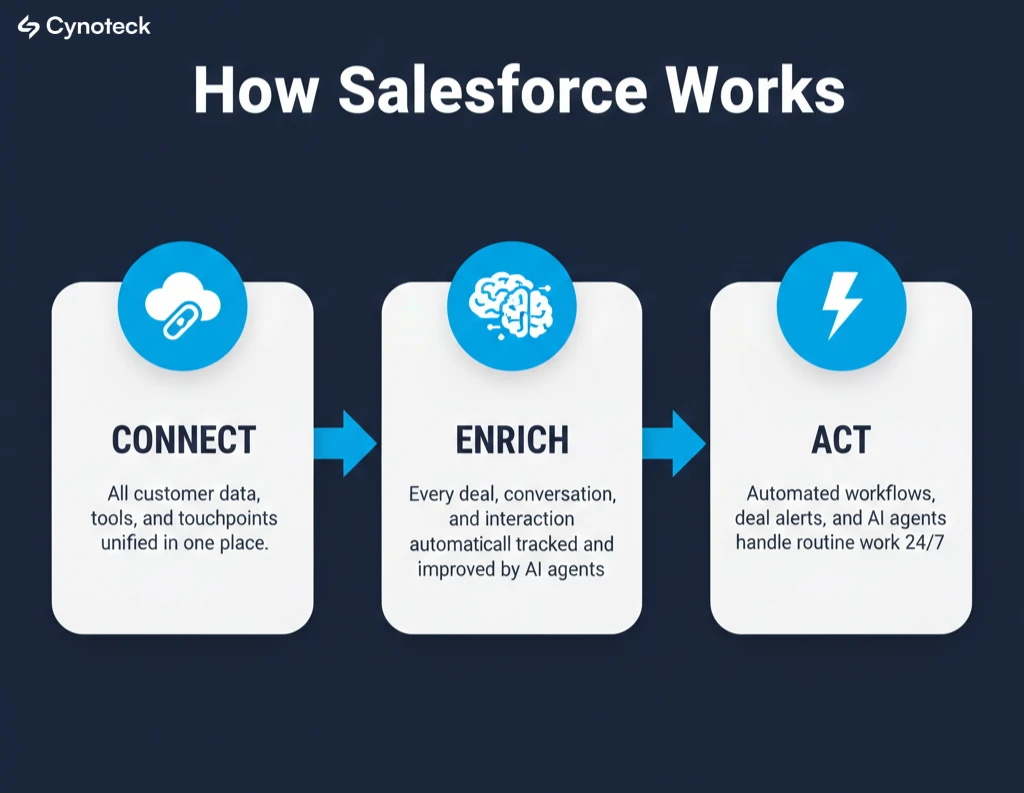
Think of Salesforce as a three-step engine for your business: Connect, Enrich, Act.
Connect: Salesforce gathers all your customer information and activities into one place. Your systems, emails, tools, and touchpoints are linked so everyone sees the same up-to-date data.
Enrich: Salesforce goes beyond just collecting data. It tracks customer journeys, automatically records every deal, conversation, and interaction, and adds valuable details from every source. Your team can quickly see a customer’s history, preferences, and engagement across every channel. Agentforce agents continuously enrich this data with every customer interaction, automatically improving insights.
Act: With unified and enriched information, your team can take action. Automated workflows kick in, deal alerts pop up, and customer support can respond instantly with the right context. AI agents from Agentforce handle routine actions independently—qualifying leads, scheduling meetings, resolving common issues—while your team focuses on high-value interactions. Your sales team knows exactly who to call next, marketing can target the right people, and support never misses a beat.
This simple Connect, Enrich, Act loop means no more scattered spreadsheets or lost information. Instead of manually updating systems or chasing down details, everything flows automatically, and your team can focus on what matters: growing your business and delivering great customer experiences.
Sales Cloud is where your sales team tracks every opportunity from first contact through close. Your team can see exactly which prospects are qualified, which deals are moving forward, and which need attention.
When a sales rep logs into Sales Cloud, they see:
List of all their leads and opportunities with current status.
Key information about each prospect (company, industry, budget, timeline).
Automated reminders for next steps and follow-ups.
AI-powered suggestions about which deals to focus on.
Deal history and all customer conversations in one place.
AI Sales Agents automatically qualify leads, research prospects, and schedule meetings.
Instead of managing spreadsheets, your team manages deals intelligently. The system predicts which opportunities are most likely to close and reminds your team when it’s time to follow up. AI Sales Agents handle prospect research and lead qualification independently, freeing your reps to focus on selling.
In fact, companies using Salesforce and its AI-powered suggestions have seen up to a 29% increase in win rates and an average 36% faster sales cycle. These results were typically observed among mid-size B2B sales organizations within the first year of adoption, according to Salesforce customer reports. Reports show the exact amount of revenue in the pipeline and the expected close date.
Service Cloud powers your customer support operations by centralizing all customer issues and interactions. Your support team has complete visibility into each customer’s history and can resolve problems faster because they don’t have to ask customers to repeat themselves. With AI Service Agents, your support team can resolve even more issues instantly while providing 24/7 support.
When a customer contacts your support team through email, chat, phone, or social media, the agent immediately sees:
Complete customer history, including all previous issues.
Products they’ve purchased and support history.
Previous conversations and how they were resolved.
Knowledge articles that might solve their problem.
Related orders and account information.
AI Service Agent recommendations for instant resolution.
Instead of searching through emails or asking customers to repeat their problem, support agents have all the context they need. The system also learns from common issues and provides instant answers to frequently asked questions through a self-service knowledge base. AI Service Agents handle routine customer questions and basic issue resolution independently, available 24/7, while your team tackles complex problems.
Marketing Cloud helps you send the right message to the right person at the right time. You can create automated email campaigns, segment audiences based on behavior, and track which campaigns actually generate leads and revenue. AI Marketing Agents ensure every interaction is personalized and perfectly timed.
Your marketing team can:
Create email campaigns that automatically respond to customer behavior.
Segment prospects by industry, company size, or engagement level.
Send personalized recommendations based on browsing history.
Track which campaigns generate the most qualified leads.
See exactly which marketing efforts turn into actual sales.
Deploy AI Marketing Agents that personalize every customer interaction automatically.
Instead of sending generic messages to everyone, Marketing Cloud helps you personalize communication at scale. When prospects fill out a form, they automatically become leads for your sales team. When customers abandon a shopping cart, they get a reminder email. AI Marketing Agents handle personalization and timing automatically, continuously learning what resonates with different customer segments. Marketing finally knows which campaigns actually work.
Commerce Cloud runs your e-commerce operations by connecting your online store with customer, order, and inventory data. You can manage B2B and B2C stores, handle complex pricing, and provide personalized shopping experiences.
Features include:
Product catalogs and inventory management.
Complex pricing for different customer types.
Shopping cart and checkout processes.
Order history and customer preferences.
Integration with accounting and fulfillment systems.
Commerce Cloud helps e-commerce teams sell more by personalizing experiences and efficiently managing complex operations.
Experience Cloud creates personalized portals where customers can solve problems themselves, partners can access tools they need, and communities can share knowledge. This reduces support tickets and improves customer satisfaction.
You can build:
Customer portals where clients check order status and access resources.
Partner communities where resellers access sales tools and training.
Help centers where customers find answers themselves.
Private communities where customers share best practices.
Self-service options reduce support tickets by 30% and improve customer satisfaction by providing instant answers. For example, if your support team receives 1,000 tickets per month, that means 300 fewer tickets to handle. This could reduce the workload of one full-time support agent by $3,000–$5,000 per month in staffing costs, freeing your team to focus on more complex customer needs.
Tableau Analytics transforms your business data into visual dashboards that anyone can understand without being a data scientist. Your leadership team sees real-time insights about sales performance, customer trends, and business health.
Dashboards show:
Real-time sales pipeline and revenue forecasts.
Customer acquisition costs and lifetime value.
Team performance metrics and productivity trends.
Unusual patterns that need attention.
Trends that affect your business strategy.
Instead of waiting for monthly reports or struggling through spreadsheets, your entire team sees live data and understands what’s happening in your business right now. Imagine your CEO watching the dashboard light up with a sudden drop in a major deal. With a few clicks and a quick call, the sales team jumps in to rescue the opportunity before it’s lost. That real-time insight doesn’t just keep you informed, it gives you the power to act when it matters most.
Einstein AI is built into Salesforce and helps your team work smarter without needing a data scientist. It predicts outcomes, suggests actions, automates routine tasks, and provides intelligent insights. Agentforce takes this further with agentic AI—autonomous agents that work independently, learn from every interaction, and continuously improve.
Einstein and Agentforce can:
Predict which leads are most likely to convert and close.
Identify which customers might leave.
Suggest the best time to follow up with prospects.
Write draft emails for your sales team.
Summarize customer conversations automatically.
Recommend next actions based on similar situations.
Autonomously qualify leads and schedule meetings (Sales Agents).
Independently resolve common customer issues (Service Agents).
Automatically personalize customer interactions (Marketing Agents).
Work 24/7, continuously learning and improving from interactions.
AI and agentic AI in Salesforce aren’t replacing humans; they're partnering with them to enhance their capabilities. Think of Einstein and Agentforce agents as trusted coworkers who provide recommendations and handle routine work, not decision-makers. For example, your sales rep gets an alert from Einstein suggesting which deal to prioritize next. The rep can accept or override the suggestion based on their own judgment and experience. Meanwhile, AI Sales Agents independently research prospects and schedule meetings.
This collaboration means your team stays in control and has transparency into why each suggestion is made. AI helps your sales rep focus on the right opportunities while they still make the final call. Agentforce agents handle the routine work so humans can focus on selling. Similarly, your support agents use AI-driven insights to resolve problems faster, and AI Service Agents resolve basic issues instantly, but humans still steer complex interactions.
Companies using Salesforce report measurable improvements in their operations. These aren’t theoretical benefits—they’re real outcomes from actual users.
When your sales reps have visibility into their complete pipeline and AI-powered insights about which deals to focus on, they close deals faster. Your team stops losing opportunities by preventing information from getting lost in email threads. AI Sales Agents handle prospect research and qualification, freeing your reps to focus on closing deals.
When support agents can instantly access the complete customer history, they resolve problems faster. Customers don’t repeat themselves and feel they’re dealing with a single company rather than multiple disconnected departments. AI Service Agents provide 24/7 support, handling routine issues instantly while your team focuses on complex problems.
When you can measure which campaigns generate real leads and track them through to sales, you spend marketing budget more smartly. You know what works and what wastes money. AI Marketing Agents ensure every customer receives perfectly personalized, perfectly timed interactions.
Real-time dashboards accurately reflect your business performance. Your CFO knows actual revenue forecasts instead of guessing. Your CEO sees trends and responds to problems before they become crises.
Every hour spent on manual data entry, spreadsheet updates, and information transfer is an hour not spent on strategic work. Automation handles routine tasks, allowing your team to focus on growth. Agentforce agents handle even more routine work independently—qualifying leads, scheduling meetings, resolving common issues—multiplying your team’s capacity.
Salesforce serves over 150,000 companies worldwide—startups, mid-market companies, and Fortune 500 enterprises. The platform works for any business that manages customer relationships.
Sales organizations use Salesforce because it helps teams close deals faster and forecast accurately. With AI Sales Agents, sales teams sell faster by eliminating research and qualification busywork.
Support organizations use it because it helps resolve customer issues quickly and reduces support costs through automation. AI Service Agents provide 24/7 support at a fraction of the cost of traditional support.
Marketing teams use it because it helps them personalize campaigns, measure ROI, and generate better leads. AI Marketing Agents scale personalization effortlessly.
Financial services companies use it to manage complex customer relationships and comply with regulations.
Healthcare organizations use it to manage patient relationships and comply with privacy requirements.
Nonprofits use it to manage donor relationships and run campaigns efficiently.
E-commerce companies use it to personalize shopping experiences and manage complex operations.
Manufacturers use it because it helps manage complex sales cycles and support large numbers of customers.
The common thread: they all need to manage customer relationships, improve team collaboration, and make data-driven decisions. Now, with Agentforce, they also gain autonomous agents that multiply team capacity and enable 24/7 operations.
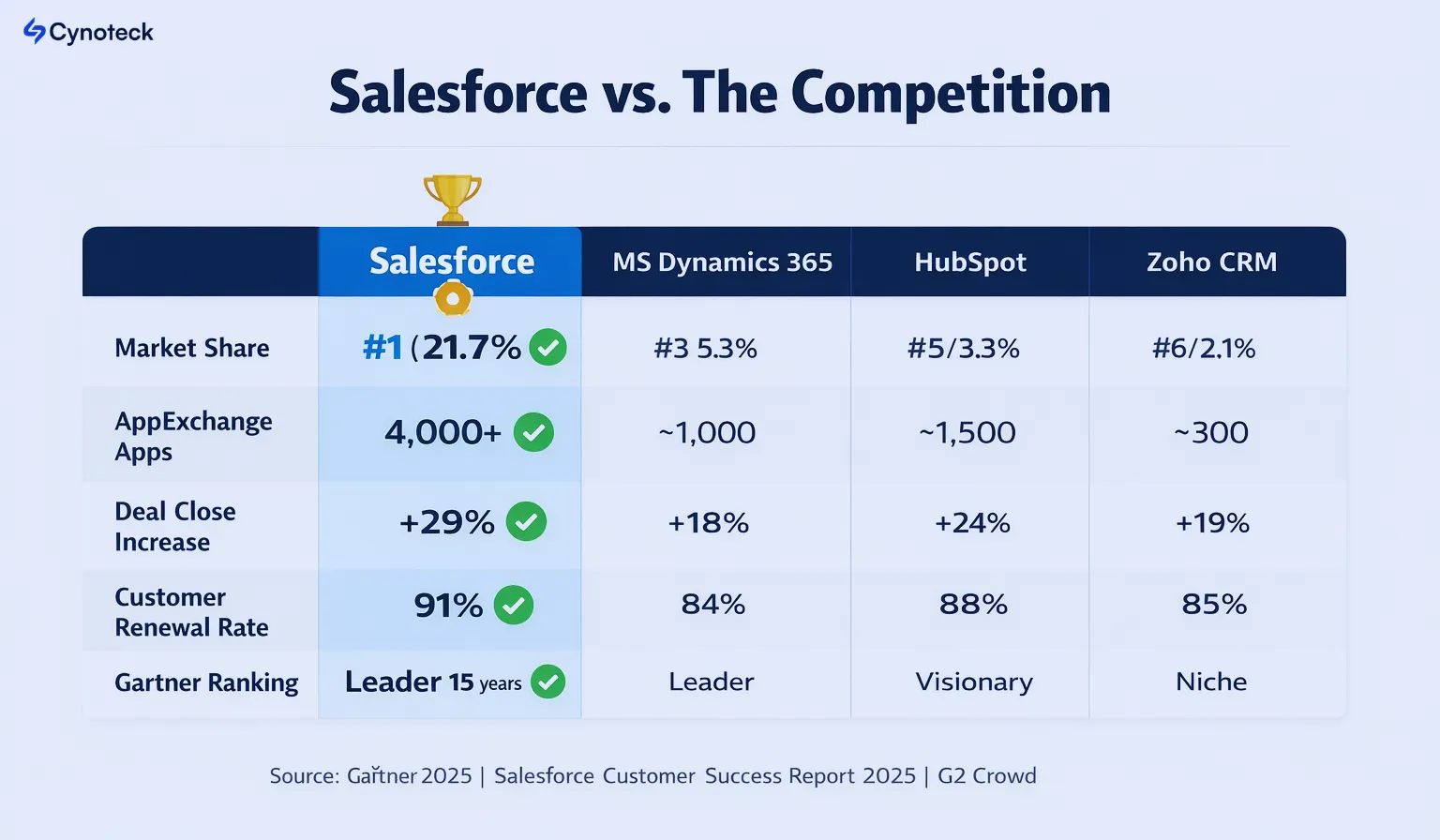
Market share leader | #1 (21.7%) Salesforce | #3 (5.3%) MS Dynamics 365 | #5 (3.3%) HubSpot | #6 (2.1%) Zoho CRM |
AppExchange marketplace | 4,000+ native apps | ~1,000 | ~1,500 | ~300 |
Average deal close increase | +29% | +18% | +24% | +19% |
Customer satisfaction score | 91% renewal rate | 84% | 88% | 85% |
Time to deploy (mid-market) | 4–12 weeks | 12–26 weeks | 6–16 weeks | 8–20 weeks |
Gartner Magic Quadrant | Leader 15 years | Leader | Visionary | Niche |
Source: Gartner 2025, Salesforce Customer Success Report 2025, G2 Crowd
Get a free personalized walkthrough showing exactly how Salesforce outperforms your current setup for your business.
Request a Free DemoIf you’re not using a system like Salesforce, your business is likely to face predictable problems.
1 Deals slip through the cracks: When deals aren’t tracked systematically, some fall through because of missed follow-ups or forgotten conversations.
2 Your team duplicates work: Sales reps manually enter information into spreadsheets and emails. Support agents search through old emails. Marketing copies contact information between systems.
3 Nobody sees the full picture: Your sales forecast is guesswork. Your marketing doesn’t know which campaigns generate real leads. Your support team doesn’t have access to customer history.
4 You can’t scale: When you’re managing everything manually, adding more customers just increases administrative burden rather than revenue.
5 You lose opportunities: Without visibility into customer interactions across teams, you miss cross-selling, upselling, and retention opportunities.
6 Your team gets frustrated: Manual, repetitive work is frustrating. When your team spends time on administration instead of strategic work, they become less engaged.
Salesforce offers different versions at different price points. The right choice depends on your company’s size and needs.
Starter Edition is the most basic option designed for small teams just getting started with CRM. It includes essential features like lead management, opportunity tracking, and basic reporting. This works well if you’re a startup or small business testing whether CRM helps.
Professional Edition is where most growing companies start because it adds workflow automation, advanced reporting, API access for integrations, and more customization options. If you’re ready to systematize your sales process and integrate with other tools, Professional Edition makes sense.
Enterprise Edition removes customization limits and adds advanced features, including custom applications, advanced automation, unlimited API calls, and premium support. Choose this if you have complex business requirements or multiple departments using Salesforce.
Unlimited Edition is the most powerful version with everything available. Choose this if you need maximum flexibility or run highly complex operations.
Pricing per user per month ranges from $25 (Starter) to $330+ (Unlimited). Most companies pay $5,000- $50,000 annually, depending on company size and edition. Agentforce pricing starts at $125 per agent per month, allowing you to deploy autonomous agents where they create the most value.
Starter | $25/user | 1-10 (SMBs) | Basic leads, mobile app, Einstein basics | $1,500 |
Professional | $80/user | 2-50 (Growing teams) | Workflow automation, reports, API access | $4,800 |
Enterprise | $165/user (up 6%) | 25+ (Mid-market) | Custom apps, advanced AI, unlimited support | $9,900 |
Unlimited | $330/user (up 6%) | 50+ (Enterprises) | Full sandbox, premium support, unlimited agents | $19,800 |
Agentforce Add-On | $125/user (new bundle) | Any Enterprise+ | Autonomous AI agents, 100K Flex Credits free | $7,500 (add-on for 5 users) |
Agentforce 1 Edition | $550/user | AI-heavy ops | Unlimited agents, Data Cloud credits, Slack+ | $33,000 |
Stop overpaying for features you don't need. Our consultants match you with the right Salesforce plan in one call.
Get a Free RecommendationImplementation timeline depends on how complex your business is and how customized you want Salesforce to be.
This covers essential setup, basic automation, team training, and simple integrations. You get Salesforce running and delivering value relatively quickly.
This adds more complex automation, multiple integrations, custom reports, and more extensive training. Your processes are more systematized.
This includes heavy customization, complex business logic, multiple clouds (Sales, Service, Marketing), extensive integrations, and comprehensive training. Enterprise implementations fall into this category.
You can also implement Salesforce yourself with minimal help if you keep it simple. The longer timeline usually stems from a desire to customize Salesforce extensively to match your existing processes, rather than adapting your processes to Salesforce.
One of Salesforce’s biggest strengths is its integration with nearly everything your business uses. You don’t have to replace all your tools—you just connect them to Salesforce.
Email integrations connect your Gmail or Outlook inbox so emails automatically sync with Salesforce. No manual data entry needed.
Accounting integrations connect QuickBooks or other accounting software to ensure financial data flows automatically between systems.
Communication integrations connect Slack or Teams, so you get Salesforce notifications in your chat tool.
E-commerce integrations connect Shopify and other e-commerce platforms, enabling orders to automatically create customer records and opportunities.
Marketing automation integrations connect tools such as HubSpot and Marketo, enabling leads to flow automatically between systems.
Payment integrations connect payment processors so that payment data updates automatically.
Thousands of other integrations are available through AppExchange, Salesforce’s app marketplace. If you use a popular business tool, Salesforce probably integrates with it.
This means you don’t have to choose between Salesforce and your existing tools. You use Salesforce as your central system and connect everything else to it.
Reality: A spreadsheet is a contact database. Salesforce is a complete business operating system that automates processes, connects teams, provides intelligence, and scales with your company. With Agentforce, you also get autonomous AI agents multiplying team capacity.
Reality: Small companies need it more because they have fewer resources. Salesforce helps a five-person startup compete like a fifty-person company. AI agents help small teams do even more with even fewer people.
Reality: Basic implementation can be straightforward and relatively affordable. It only gets complicated if you want extensive customization. You can keep it simple and add complexity later.
Reality: Usually, sales, support, and marketing get the most value. Other departments might use it later, but you can start with one team.
Reality: Salesforce works alongside your email and calendar. In fact, most implementations integrate Salesforce with your existing email system.
Reality: Pricing starts at $25 per user monthly, which is affordable for most companies. ROI typically appears within the first year. Agentforce starts at $125 per agent per month, with ROI often realized within 3-6 months from time savings alone.
Reality: AI in Salesforce actually saves time and improves decision-making. It’s built into the platform and available to all users at no additional cost. Agentforce autonomous agents provide even more value by handling routine work independently, 24/7.
Consider your situation honestly. You’ll probably benefit significantly if several of these describe your company.
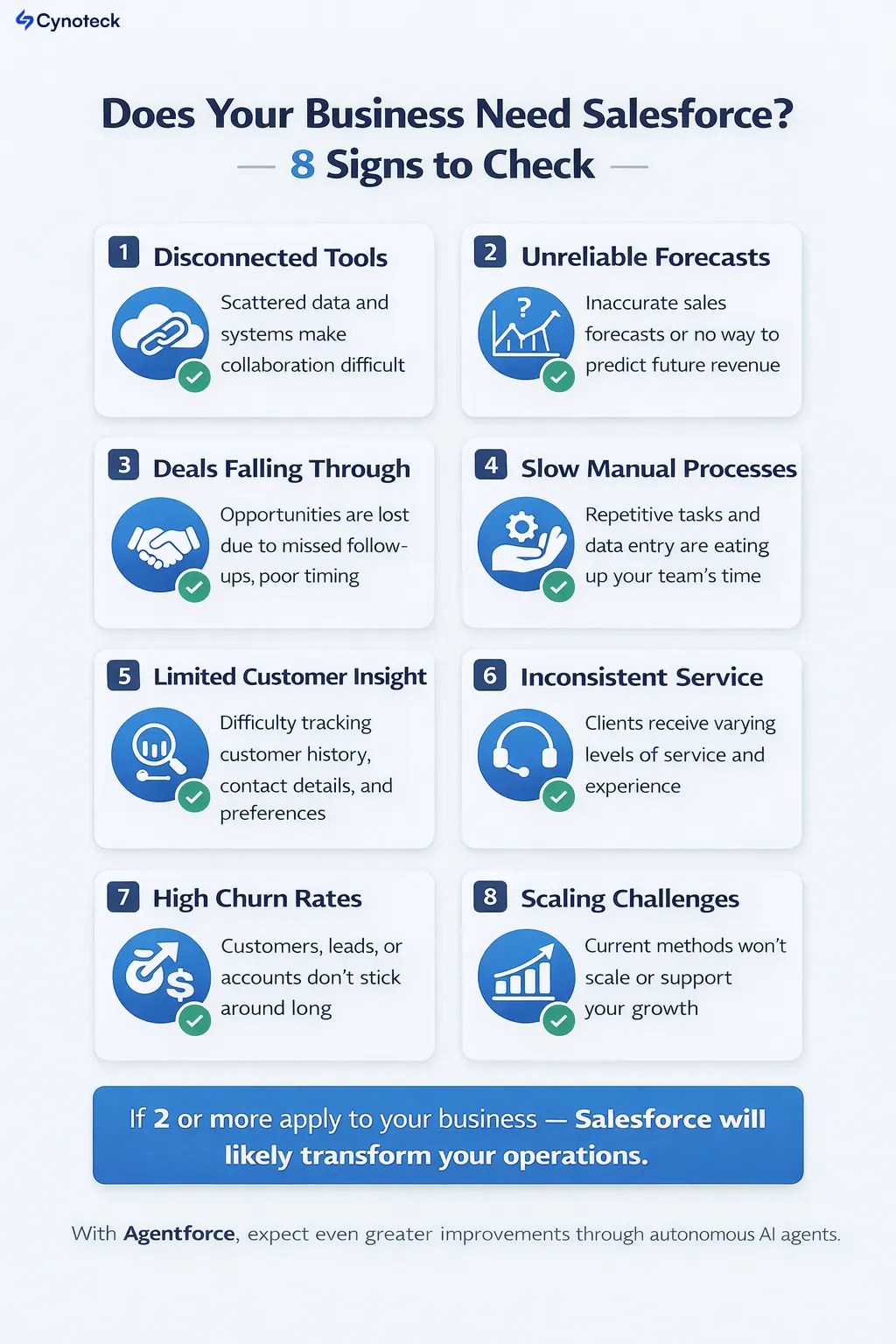
1 You’re using multiple disconnected tools: Your sales team uses one system, support uses another, and marketing uses a third. Information doesn’t flow between systems, and people manually transfer data.
2 Your sales forecast is unreliable: You’re not sure how much revenue will close this quarter because you don’t systematically track opportunities.
3 Deals regularly slip through the cracks: Prospects go quiet, and nobody follows up because reminders get buried in email.
4 You can’t measure marketing ROI: You don’t know which campaigns actually generate revenue or which ones waste money.
5 Your support team wastes time searching for information: Instead of solving problems, support agents search through old emails or ask customers to repeat themselves.
6 Administrative work consumes too much time: Your team spends hours updating spreadsheets and transferring information between systems, rather than on strategic work.
7 You’re growing faster than your systems can handle: Your team is overwhelmed with administrative work because you added customers but not administrative capacity.
8 You want to personalize customer experiences: You want to treat each customer uniquely, but can’t do that without central data and automation.
If even two or three of these describe your situation, Salesforce will likely improve your business. With Agentforce, you’ll see even greater improvements as autonomous agents handle routine work.
You probably don’t need Salesforce if you have only one or two customers, rarely follow up with prospects, don’t track sales opportunities, or if your business model doesn’t involve systematically managing customer relationships.
If Salesforce sounds right for your business, our experts will build a clear, simple roadmap tailored to your goals.
Claim Your Free ConsultationYour data security matters, and Salesforce takes it seriously. Salesforce meets stringent security standards and compliance requirements, making it safer than most companies’ internal systems.
Data encryption protects information both in transit and at rest using industry-standard encryption.
Regular security audits continuously test security systems to identify and remediate vulnerabilities.
Compliance certifications include SOC 2, ISO 27001, HIPAA (for healthcare), GDPR (for Europe), and others, depending on your industry.
Access controls let you restrict who can see which information. Not everyone needs access to all customer data.
Backup and disaster recovery mean your data is protected against loss or system failure.
Your data is actually more secure in Salesforce’s cloud infrastructure than most companies’ on-premise systems because Salesforce dedicates massive resources to security, while individual companies usually don’t.
If Salesforce sounds like it might help your business, here’s how to actually get started.
Is it sales velocity? Support efficiency? Marketing measurement? Start by solving one problem at a time, not everything at once.
Don’t try to figure this out alone. A consultant can assess your situation and recommend exactly what you need. Many offer free consultations.
Get your sales team up and running first, then add support or marketing later. This gives your team time to learn and generates quick wins.
You don’t need heavy customization right away. Get Salesforce up and running with standard features, then add customization as you learn.
Salesforce only works if your team actually uses it. Good training and ongoing support are essential.
Track metrics such as deal-closure time, support-resolution speed, and marketing ROI. You should see improvements within 90 days.
What is Salesforce really? It’s the system that brings your entire customer business together. It eliminates chaos from scattered information, automates repetitive work, and gives your team the intelligence they need to make better decisions faster. With Agentforce, your team also gains autonomous AI agents that work 24/7, handling routine work so humans can focus on high-value activities.
Salesforce isn’t a magic bullet, and it won’t fix bad business processes or poor management. But if your company has decent processes and decent people, Salesforce amplifies what you’re doing well and removes the friction that slows you down.
Most importantly, Salesforce gives you what every growing company needs: visibility into your business, consistency in how you operate, and the ability to scale without adding proportional administrative burden. With Agentforce, you can scale operations with autonomous agents that operate continuously.
If you’re struggling with scattered customer data, slow sales cycles, inconsistent support, or poor visibility into business performance, Salesforce addresses these fundamental problems directly.
Salesforce isn’t just software. It’s a system that helps you sell smarter, support better, automate faster, and scale without stress. If you're looking to improve visibility, boost revenue, or unify your teams, Salesforce is a solid investment.
If you want help choosing the right Salesforce setup or integrating it into your business, our Salesforce consulting team can guide you with a tailored approach.
Skip the research. Our certified Salesforce consultants answer your questions and build a plan that fits your business perfectly.
Talk to an Expert NowA: Pricing depends on the edition and number of users. Starter Edition is $25 per user monthly, Professional is $80, Enterprise is $165, and Unlimited is $330+. Most small companies pay $2,000 to $10,000 annually. Mid-market companies typically pay $10,000 to $50,000 annually. Agentforce starts at $125 per agent per month, with a typical ROI of 3-6 months.
A: Basic setup with a consultant takes 4-8 weeks. More complex implementations take 8-12 weeks or longer, depending on customization needs and business complexity.
A: Almost certainly. Salesforce integrates with email systems, accounting software, marketing tools, communication platforms, e-commerce systems, and thousands of other applications through AppExchange.
A: Not for basic functionality. Most users learn how to perform daily tasks in a few days. Complex administration and customization take longer, but regular users don’t need that level of expertise.
A: No. Usually, sales, support, and marketing benefit most. Other departments can use it later if needed. You can start with one team and expand from there.
A: Most Salesforce contracts have renewal terms. You can typically exit at renewal. Salesforce is flexible, but discuss contract terms before signing.
A: Yes. Salesforce has extensive security certifications and compliance standards. Cloud infrastructure is typically more secure than on-premise systems because Salesforce dedicates massive resources to security.
A: Yes. Salesforce is highly customizable. You can build custom applications, automation, reports, and integrations to match your specific business processes.
A: Agentforce is Salesforce’s agentic AI platform—meaning AI agents that can take independent action, learn from interactions, and improve automatically. While regular Salesforce gives you tools to work better, Agentforce gives you AI teammates that work alongside your people. Sales agents qualify leads. Service agents resolve issues. Marketing agents personalize interactions. All while learning and improving from every interaction.
A: Agentic AI means AI systems that work autonomously within guardrails you set. Unlike traditional AI that requires approval at each step, agentic AI takes action independently. It schedules meetings, qualifies leads, resolves customer issues, and analyzes data without constant human direction. This matters because it increases your team’s capacity without hiring additional staff.
 Outsource Salesforce Development or Build In-House Which is the Best for Your Business.webp)
Outsourcing Salesforce development vs. building an in-house Salesforce team: 2026 cost insights, salary comparisons, key benefits, challenges, and the best hiring model for your business growth.
We are more than just developers and consultants—we are your partners in navigating the digital landscape. Let us be the engine behind your next big success while you focus on your core vision.
Explore Opportunities!