What Are the Best Practices for Salesforce Customization in 2026?
Salesforce customization should align with real business workflows, user roles, data requirements, and long-term scalability. The best approach is to use configuration before custom code, govern automation, protect data, test changes in a sandbox, and maintain the org regularly.
Summary: This guide covers 12 Salesforce customization best practices for business leaders in 2026. It explains how to design your org around real workflows, govern automation, protect data quality, and prepare for Agentforce and AI without over-engineering your setup. |
Half of your sales team logs into Salesforce every morning. The other half tracks real deals in a spreadsheet on the side. The fields do not match how they are sold. The dashboards show numbers nobody asked for. Within a few months, adoption drops, and the CRM becomes a chore for record-keeping.
This pattern plays out across industries. The fix rarely involves switching platforms. It comes down to following the right Salesforce customization best practices and whether the org setup reflects how the business works.
This guide covers Salesforce customization best practices that improve CRM efficiency, protect data quality, and drive sustainable user adoption. Whether you are starting fresh or reviewing an existing setup, these principles apply to Salesforce CRM customization at any scale. What you will find here is practical guidance on workflow design, automation governance, security, AI readiness, org health, and release management.
Salesforce customization is the process of adjusting your org (your company's individual Salesforce environment) to match your actual business processes rather than a generic default setup. This can include changes to how records are organized, which fields appear on a screen, what happens automatically when someone updates a deal, or how your CRM connects to other systems.
This means something broader in 2026 than it did a few years ago. AI tools like Einstein Copilot and Agentforce (Salesforce's autonomous AI agent platform) are now part of the conversation about customization. So are release management, org health governance, and integration architecture.
The businesses that get the most from Salesforce treat customization as an ongoing discipline, not a one-time project.
Low adoption gets worse quietly, until your team explains it to leadership instead of fixing it.
Book a Free ConsultationConfiguration uses Salesforce's built-in point-and-click tools to adjust fields, page layouts, and basic automation without writing code. Customization goes further, involving Apex (Salesforce's server-side programming language) or custom Lightning Web Components (LWC) for needs that standard tools cannot meet.
In practice, most businesses need both at different times. The best practice is to use the right tool for the job.
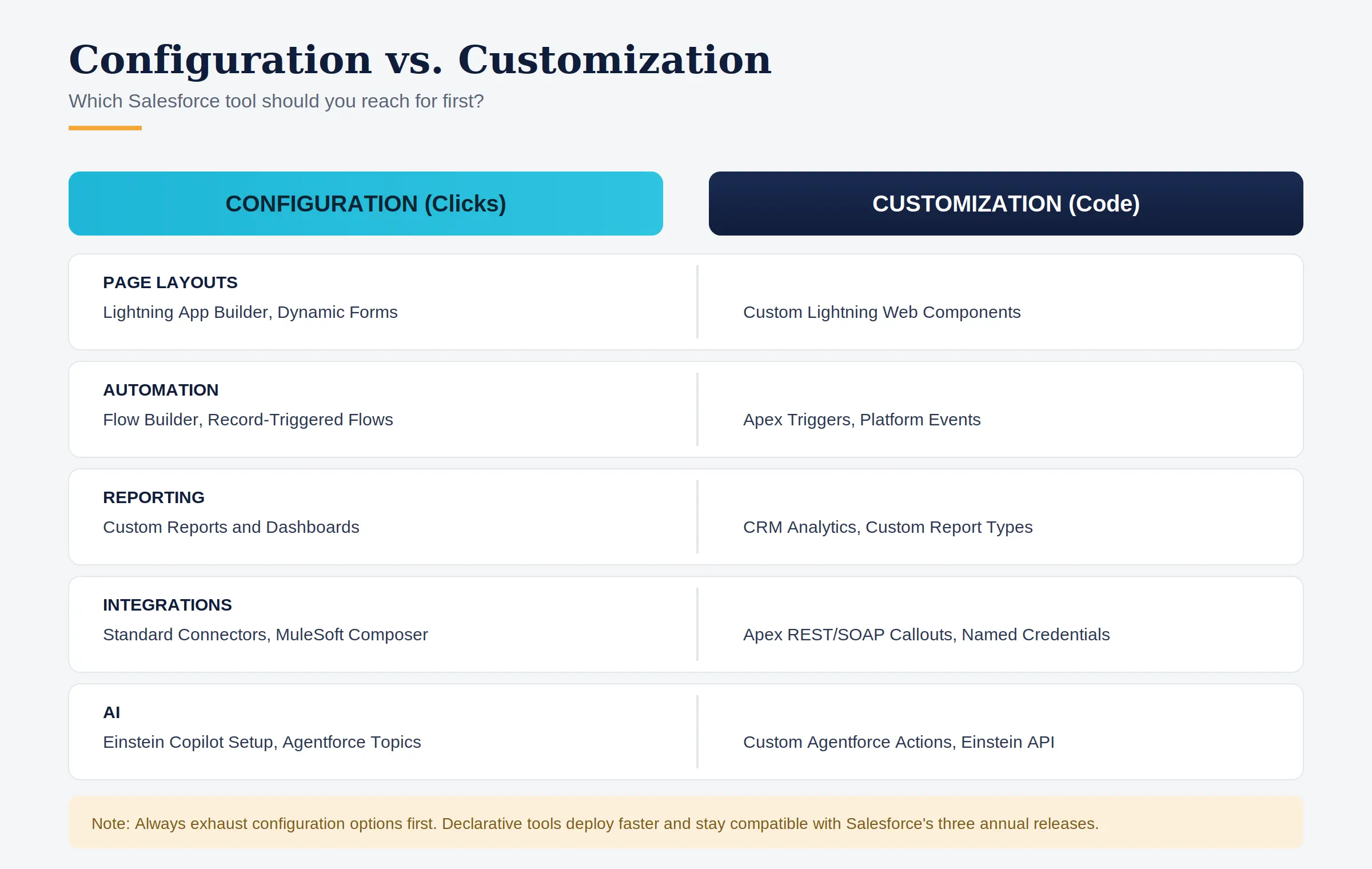
Area | Configuration (Clicks) | Customization (Code) |
Page Layouts | Lightning App Builder, Dynamic Forms | Custom Lightning Web Components |
Automation | Flow Builder, Record-Triggered Flows | Apex Triggers, Platform Events |
Reporting | Custom Reports and Dashboards | CRM Analytics, Custom Report Types |
Integrations | Standard connectors, MuleSoft Composer | Apex REST/SOAP callouts, Named Credentials |
AI | Einstein Copilot setup, Agentforce topics | Custom Agentforce Actions, Einstein API |
Security | Profiles, Permission Sets, Sharing Rules | Apex Sharing, Custom Login Flows |
Note: Always exhaust configuration options before reaching for code. Declarative tools deploy faster, carry less technical debt, and are automatically compatible with Salesforce's three annual platform releases.
Many Salesforce orgs go live with default page layouts and standard fields that were never built for a specific team's process. Sales reps scroll past fields they never fill in. Service agents click through screens that do not align with how they resolve cases. Over time, that friction adds up.
A logistics company that implements Salesforce Sales Cloud without customizing it for freight or route-based selling will see the same result every time. Reps revert to email and spreadsheets because the standard setup does not reflect how their deals move.
This is rarely a Salesforce problem. It is a customization problem.
Low daily logins, shadow spreadsheets, and dashboards nobody checks are the clearest early signals that an org needs a closer look. Addressing them is a business decision, not just a technical one.
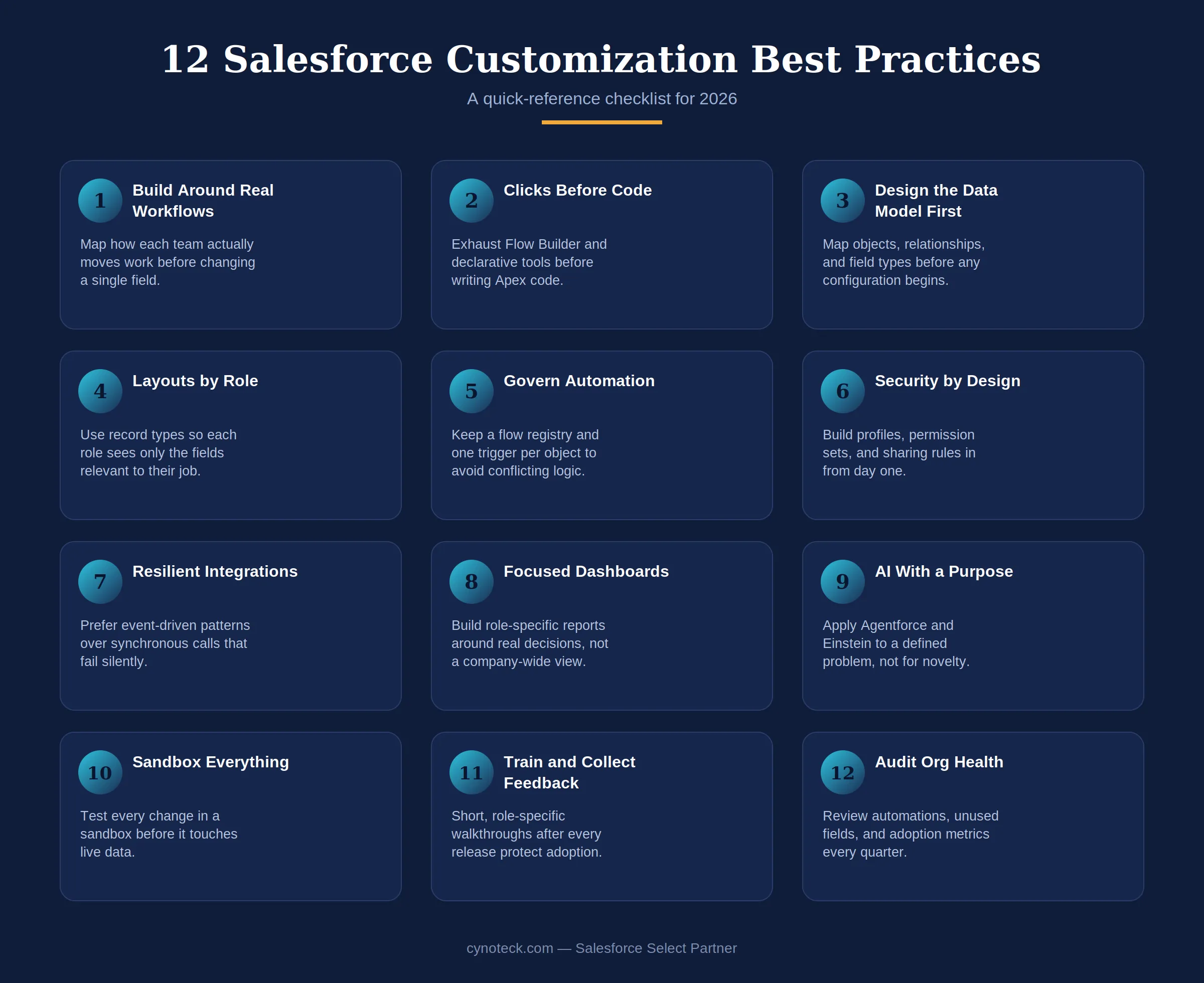
Before changing a single field, sit with the people who use the system daily. Ask sales reps how they move a deal forward. Ask service agents what information they need as soon as a case opens.
This step is skipped more often than it should be, and it is usually the reason customization projects miss the mark.
A manufacturing company selling through distributors has a very different sales process from one selling directly to consumers. Their Salesforce setup should reflect that difference. When customization starts with real workflows, the system feels like it was built for the team, because it was.
Workflow mapping session: Run a two-hour session with each team before any configuration begins. Document exactly how they move records from one stage to the next.
Manual task audit: Document the five most time-consuming manual tasks per team. Those are the first automation candidates.
Role-based data map: Map the data each role needs at each stage of a deal or case. Design page layouts around that map, not Salesforce defaults.
Friction interviews: Ask users what they dislike about the current setup before building anything new. Negative feedback is more useful than feature requests.
Pro Tip: Record these workflow sessions where possible. When you come back six months later to make changes, the recording tells you exactly what the team said they needed and why specific decisions were made.
Salesforce Flow is an automated process built within Salesforce that handles repetitive tasks without requiring anyone to click through them manually. Flow Builder has matured considerably and now handles complex logic, subflows, screen interactions, and bulk record processing without a single line of code.
Following Salesforce Flow automation best practices means exhausting declarative tools before writing Apex code, which is Salesforce's own recommended approach. Every line of custom code adds technical debt that must be tested, maintained, and reviewed after each Salesforce platform release.
The declarative toolset now covers the vast majority of real-world business requirements:
Flow Builder: Multi-step automation including record-triggered flows and screen flows.
Dynamic Forms and Dynamic Actions: Role-specific page layouts without code.
Custom Metadata Types: Configurable business logic that teams can change without a full deployment.
Salesforce Lightning App Builder: Tailored interfaces that surface the right data per role.
When code genuinely enters the picture, the clicks-before-code Salesforce principle still applies: use one Apex trigger per object with a handler class pattern to keep logic organized and prevent conflicts between competing automations.
Note: Cynoteck's certified Salesforce developers review declarative options first on every engagement before recommending custom development. This keeps orgs lean and compatible with Salesforce's seasonal updates.
Poor data model decisions are among the most expensive mistakes in a Salesforce implementation. Custom objects created without forethought, fields duplicated across objects, and relationship types chosen too quickly calcify into technical debt that is painful to reverse later.
Before any configuration begins, map your Salesforce data model: all custom objects, their relationships, and field types. Document their relationships, field types, and whether a custom object is truly necessary or whether extending a standard object would achieve the same result.
Two relationship types in Salesforce behave very differently:
Master-Detail relationships: Enforce strict data hierarchy and enable rollup summary fields. However, deleting the parent record deletes all child records.
Lookup relationships: More flexible, but do not support rollup summaries natively.
Naming conventions matter here, too. Every custom object, field, and automation should follow a consistent naming convention from day one. This keeps the org intuitive for developers, administrators, and business users who need to run reports.
A data dictionary, a document that defines each field, its expected values, and who owns the data, is one of the highest-return investments a Salesforce team can make early in a project.
Salesforce page layout customization is one of the fastest wins available in any implementation. Not every team needs to see the same fields or the same stages. Salesforce record types let you create different versions of the same object so a sales rep, a service agent, and a finance user each work from a layout built for their specific job. Properly configured Salesforce page layouts keep screens clean and reduce the chance of data being entered in the wrong place.
A healthcare services provider might use one record type for new patient referrals and a separate one for renewal contracts. Each layout shows only the fields relevant to that process. That is a small configuration change with a direct effect on how fast people work and how clean the resulting data becomes.
Salesforce CRM customization at the role level is one of the most direct ways to improve daily adoption. Role-based design principles:
Information hierarchy: Design pages so users see the most critical information without scrolling.
Information density: Use tabs and accordions to manage detail without hiding what matters.
Mobile experience: Factor mobile layouts in from the beginning, especially for field sales and service teams.
User Acceptance Testing: Run structured UAT with actual end users before any layout change reaches production.
As Salesforce orgs mature, automation accumulates. Flows trigger other flows. Apex triggers fire alongside Process Builders left over from earlier implementations. Without governance, these layers interact in ways nobody planned for, causing order-of-execution issues, infinite loops, and data corruption that is difficult to trace.
Salesforce imposes governor limits to protect shared infrastructure. These are hard caps on the number of SOQL queries (the language used to retrieve Salesforce data), DML operations (data write commands), and API callouts a single transaction can make. Automations that process records one at a time in a loop hit these limits quickly under real data volumes.
Ignoring Salesforce governor limits during automation design is one of the most common causes of org instability under real data volumes.
One trigger per object: Maintain one Apex trigger per object using a handler class to delegate logic to modular service classes.
Flow registry: Keep a centralized document that records every active flow, its trigger conditions, and its business owner.
Bulk processing: Build all automations to process records in bulk, not one at a time.
Exception handling: Include error handling in every flow and trigger so failures surface clearly rather than rolling back silently.
Process Builder migration: Migrate active Process Builders to Flow Builder. Salesforce has retired Process Builder, and maintaining legacy automations alongside newer flows increases the risk of conflicts.
Note: A field service company that replaced ad hoc automations with structured record-triggered flows significantly reduced manual dispatch time because the system handled routine assignments and surfaced only exceptions for human review.
Salesforce security is not a layer you add on top of an implementation after everything else is built. It is a design requirement that should be woven into every decision from the beginning. Teams that defer security to go-live end up with costly retrofits.
Users should access only the data and functionality their role genuinely requires. Every new custom field should have field-level security configured alongside it, not added after the fact.
Profiles: Control default access, including login hours, IP restrictions, and the user's default app. Keep them limited to must-have settings.
Salesforce Permission Sets and Permission Set Groups: Assign specific access for custom objects, fields, and automation tools. Permission Sets make access modular and easy to adjust without changing profiles.
Organization-Wide Defaults (OWD): Control who can see which records by default. Set these first before building any sharing rules.
Role Hierarchies and Sharing Rules: Control record visibility deliberately rather than by accident.
Field Audit Trail and Event Monitoring: Part of Salesforce Shield, these provide the data access history that compliance frameworks like HIPAA and GDPR require.
For organizations in regulated industries, Salesforce Shield's Platform Encryption capabilities are increasingly required rather than optional.
Salesforce integration architecture is where many orgs develop silent failure points. Salesforce rarely operates in isolation. Most enterprise orgs connect to ERP systems, marketing platforms, financial software, data warehouses, and AI services. How those integrations are architected determines whether they hold up under load or create silent failure points.
The most important principle is preferring event-driven integration over synchronous API calls wherever possible. Platform Events and Change Data Capture enable real-time integrations that remain loosely connected and resilient to downstream failures.
A synchronous API call that fails silently can leave data inconsistent across systems. An event-driven pattern retries and recovers.
Named Credentials: Store all API credentials in Named Credentials rather than hardcoding them in Apex classes.
Error handling: Build retry logic and monitoring dashboards into every integration from the start.
Middleware for complexity: For multi-system scenarios, a middleware platform like MuleSoft provides governance and reusable API assets that point-to-point integrations cannot replicate.
Change Data Capture: Use this to detect and respond to record changes in near real time without polling.
Volume testing: Test integrations under realistic data volumes before go-live, not just against a few test records.
A good integration holds up when your ERP, marketing stack, or a custom API fails downstream, not just when everything's working.
Review My Integration SetupA cluttered Salesforce dashboard is just as harmful as missing data. A sales manager needs different numbers than a support team lead, and a dashboard that tries to serve everyone usually serves no one well.
Build Salesforce reports around the specific decisions each team makes, then remove anything that does not support those decisions.
This directly affects adoption. When a rep opens a dashboard and sees the exact numbers they are measured on, the CRM starts to feel useful rather than decorative.
Role-specific dashboards: Each user should see their own KPIs by default, not a company-wide view that they have to filter manually.
Scheduled refreshes: Set dashboards to refresh so data is current when users arrive each morning.
Relevant report types: Use report types that reflect the relationships users navigate, not just the object structure in the data model.
Quarterly review: Check dashboard usage data every quarter and retire any component that nobody has clicked on in 60 days.
Einstein Copilot, Agentforce, predictive scoring, and sentiment analysis have moved from experimental features to production-ready tools in 2026. The organizations that get measurable value from them share one discipline: they apply AI to a clearly defined business problem with a defined success metric, rather than deploying it simply because it is new.
Strong use cases for Salesforce Agentforce customization include improving lead-scoring accuracy, automating first-tier case resolution, more reliably forecasting the pipeline, and personalizing customer communications at scale.
Important: Data quality is the upstream dependency that most organizations underinvest in before enabling AI. Incomplete or duplicated Salesforce data produces unreliable Einstein outputs. Clean, governed data is the prerequisite. AI builds on top of it, not the other way around.
Einstein Copilot: Can be customized with business-specific topics, actions, and knowledge sources that make it more effective than the default configuration.
Agentforce agents: Can be designed with guardrails that define what they can and cannot do autonomously. This is essential for customer-facing workflows.
Predictive scoring: Requires regular retraining as market conditions and buyer behavior change.
AI-generated summaries: Field teams and service agents benefit from summaries that reduce the time spent reading case history before a customer interaction.
Pro Tip: Cynoteck's Agentforce customization practice helps businesses define the right AI use cases, prepare data for model readiness, and build Agentforce agents with appropriate governance guardrails.
The agents that actually get used start with one clear job, whether that's lead scoring, case resolution, or a customer-facing task.
Plan My Agentforce Use CaseSalesforce sandbox testing is the single most important step between building a change and releasing it to users. A sandbox is a test version of your org where changes are validated before they affect live data. Every customization, however minor it may appear, should be built and tested in a sandbox first.
A flow that works fine in isolation can conflict with an existing automation once it touches live records. A new validation rule can block users from saving records that they were able to update the day before. Sandbox testing catches these conflicts early.
Developer Sandboxes: For individual configuration and development work.
Partial Sandboxes: For integration testing with a representative data sample.
Full Sandboxes: For User Acceptance Testing that mirrors production closely.
Source control via Salesforce DX and Git: So all metadata, Apex classes, flows, and components are versioned and recoverable.
CI/CD pipelines: Tools like Copado or Gearset automate validation and deployment, reducing the human error that manual change sets introduce.
Salesforce user adoption is directly affected by what happens in the days after a change goes live, not just how the change was built. Customization does not end at release. Users need a short walkthrough explaining what changed and why, especially when a familiar screen now looks different. Skipping this step is a common reason adoption drops, even after well-built customization.
The most effective training is role-specific and brief. A five-minute walkthrough showing a rep exactly how the updated pipeline stage works beats a 30-page guide nobody reads. Recorded walkthroughs also serve new hires who join after the change.
Feedback channel: A shared form or channel for users to flag confusion, reviewed weekly by whoever owns the Salesforce configuration.
Monthly pulse checks: Brief conversations with three or four users from each team to surface friction that does not make it into formal feedback.
Dashboard usage review: Quarterly check on which reports and components are being used.
This feedback loop turns customization into an ongoing process. It is often the difference between an org that stays useful year after year and one that slowly falls out of step with the business.
Salesforce org health management is an ongoing responsibility, not a one-time cleanup. Even well-managed Salesforce orgs accumulate bloat over time. Inactive flows still consume processing cycles. Unused custom fields clutter page layouts. Deprecated Apex classes confuse new developers. None of this happens suddenly. It builds gradually and quietly.
Salesforce's Health Check tool provides a starting point for these reviews. Third-party org analysis tools complement it. Beyond tooling, the discipline of asking regularly whether something still serves a business purpose is what keeps an org lean and maintainable.
Automation review: Check active automations for relevance, efficiency, and overlap with newer flows.
Unused fields and objects: Identify fields and objects with zero or minimal usage in the past 90 days.
Apex code coverage: Flag gaps and outdated API versions.
Integration logs: Check for recurring errors or performance bottlenecks.
User adoption metrics: Identify features the team is not using and investigate why.
Retirement: Archive or delete retired record types, page layouts, and reports to reduce admin cognitive load.
Technical debt in Salesforce is inevitable. The only question is whether it is managed deliberately or allowed to compound until it causes real operational problems.
Cynoteck is a Salesforce Select Partner with over 250 certified professionals and 150 plus completed Salesforce projects. Select Partner is a verified tier within Salesforce's consulting partner program, awarded to firms that meet Salesforce's standards across certifications, CSAT scores, and completed project outcomes.
For businesses whose orgs have grown beyond what their internal team can manage, or whose Salesforce customization best practices were never fully applied, Cynoteck provides a structured path forward.
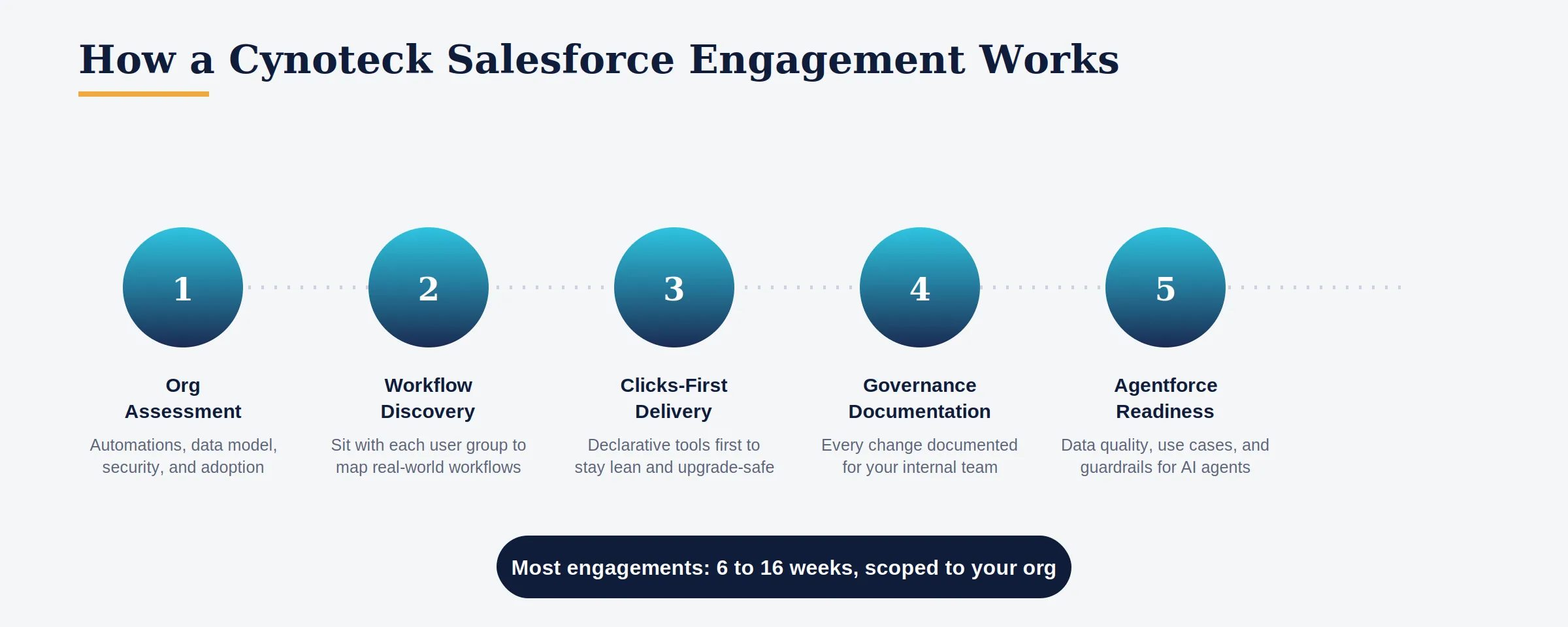
Here is how a typical engagement works:
Org assessment: We review your current setup: active automations, data model, integration architecture, security model, and user adoption data. This gives a clear picture of what is working and what is not before any changes are made.
Workflow discovery: Our consultants sit with each user group to map real workflows. This step is the foundation for every customization decision.
Clicks-first delivery: We exhaust declarative tools before recommending Apex development. This keeps your org lean and upgrade-compatible.
Governance documentation: Every automation, integration, and custom object is documented so your internal team can maintain and extend the org after the engagement.
Agentforce readiness: For businesses planning AI deployment, we assess data quality, define use cases, and build Agentforce agents with appropriate guardrails.
Most Salesforce customization projects at Cynoteck are scoped and delivered within 6 to 16 weeks, depending on complexity. We start with a defined scope and expand based on the org's needs, not on a predetermined feature list.
Book a free 30-minute consultation to review your current Salesforce setup and identify the highest-impact changes for your team.
Whether you're implementing new features, improving user adoption, or modernizing an existing Salesforce org, the right strategy makes all the difference.
Start My Salesforce Customization PlanWhen Salesforce customization is built around real workflows, properly tested, consistently governed, and supported by training, the results compound over time. Sales cycles shorten because reps are not fighting the system. Service teams resolve cases faster because the right information is already on screen. Data quality improves because people are more likely to enter information correctly when the fields reflect their job.
A regional financial services firm that customized its Service Cloud setup around its actual client onboarding process saw faster case resolution and higher daily logins within a few months. None of that came from new licenses or extra headcount. It came from aligning the system with how the business already worked.
The organizations that extract the most from Salesforce in 2026 apply Salesforce customization best practices the same way they approach any strategic initiative: planning carefully, governing consistently, and iterating with purpose.
If your team is working around the CRM rather than through it, that is the clearest signal that it is time for a closer look. Cynoteck's certified Salesforce consultants can review your org and recommend customization that fits how your teams work.
Talk to a Cynoteck Salesforce Consultant. Book a Free Org Assessment.
Configuration uses Salesforce's built-in setup tools to adjust fields, page layouts, and basic automation without writing code. Customization goes further and typically involves Apex code, custom Lightning Web Components, or API integrations for needs that declarative tools cannot cover. For most businesses, configuration covers the bulk of what is needed. Customization comes into play when a specific business process genuinely cannot be met any other way.
A few page layout and automation changes might take one to two weeks, including sandbox testing. A broader project covering multiple teams, workflows, and integrations typically runs six to eight weeks. A full org implementation or Agentforce customization project usually takes ten to sixteen weeks, depending on data complexity and the number of integrations involved.
Well-built customization tested in a sandbox before each of Salesforce's three annual releases rarely breaks. Problems usually come from skipping sandbox testing or from automations that were never reviewed after the initial build. Following the clicks-before-code principle reduces upgrade risk significantly because declarative configurations are automatically compatible with Salesforce releases.
Salesforce Flow is Salesforce's built-in automation tool that handles multi-step business processes without code. You can use it to auto-assign leads, send follow-up reminders, update records when conditions are met, or guide users through a screen-based process. Flow should be the first tool you reach for before considering any custom Apex code. In 2026, Flow Builder handles the vast majority of real-world automation requirements.
Governor limits are hard caps that Salesforce enforces to protect shared platform infrastructure. They limit the number of SOQL queries, DML operations, and API callouts a single transaction can make. Customization that processes records one at a time in a loop quickly hits these limits with real data volumes. Building all automations to handle bulk records from the start prevents governor limit errors from appearing when real data runs through the system.
Common signs include low daily logins, team members using spreadsheets alongside the CRM, dashboards that no one checks, manual tasks that could be automated, and frequent requests to add or change fields. If your team treats Salesforce as a record-keeping system rather than a tool that helps them do their job, that is the clearest signal that revisiting your Salesforce customization best practices is overdue.
Yes. Over-customization makes an org harder to maintain, confusing for new users, and more expensive to upgrade. Every customization should solve a real, documented business problem. The best Salesforce orgs are not the most heavily customized. They are the ones for whom every change earns its place by solving a specific problem.
Agentforce lets you build autonomous AI agents that can take actions in Salesforce on behalf of users, such as routing cases, answering customer questions, or qualifying leads. Unlike standard Einstein features that surface predictions and recommendations, Agentforce agents can act without human approval at each step. Customizing Agentforce means defining the topics an agent covers, the actions it can take, and the guardrails that determine when it escalates to a human.
 Outsource Salesforce Development or Build In-House Which is the Best for Your Business.webp)
Outsourcing Salesforce development vs. building an in-house Salesforce team: 2026 cost insights, salary comparisons, key benefits, challenges, and the best hiring model for your business growth.
We are more than just developers and consultants—we are your partners in navigating the digital landscape. Let us be the engine behind your next big success while you focus on your core vision.
Explore Opportunities!